For development teams, the gap between finding a site and knowing whether it's worth pursuing is costly in time, money, and deals that slip away while the analysis catches up. A promising parcel can turn into weeks of zoning research and engineer calls, and by the time you have a clear picture of what the site can yield, the window has moved.
Acres Site Planner was built to close that gap.
The Problem: Feasibility Analysis Comes Too Late in the Process
Land acquisition moves fast. Sellers have options, markets shift, and the teams that can evaluate a site quickly and credibly win more deals. But the traditional feasibility process wasn't designed for speed.
Running a meaningful lot yield means pulling together zoning codes, flood and wetlands data, density limits, and product type assumptions. Doing that manually takes days, even for an experienced team. Bringing in a site engineer is the right move for the sites worth pursuing. The challenge is knowing which ones are actually viable before that investment is made.
You need the feasibility analysis to make the go/no-go call, but committing to the analysis means you've already made a partial bet on the site.
The Solution: A Lot Yield You Can Run Before the Engineer Call
Acres Site Planner puts a credible lot yield in the hands of the land team before anyone calls the engineer.
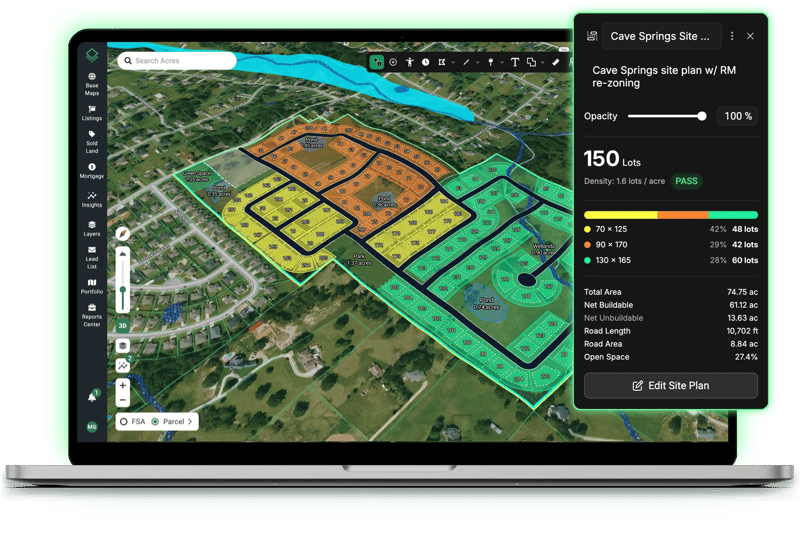
Working directly inside Acres, teams can select a parcel, set their product type specifications, and generate realistic lot yield in minutes. A site plan with roads, lot types, exclusion zones, density checks, and a full summary of buildable area, road length, and open space — built against the actual parcel boundary, with wetlands and flood zones auto-detected and applied.
The key distinction is that Site Planner is a feasibility tool. It doesn't replace the site engineer, it filters the pipeline so that engineers’ time and expertise are focused on the sites that have already earned a closer look.
How It Works: From Parcel Search to Lot Yield
Setting Your Constraints
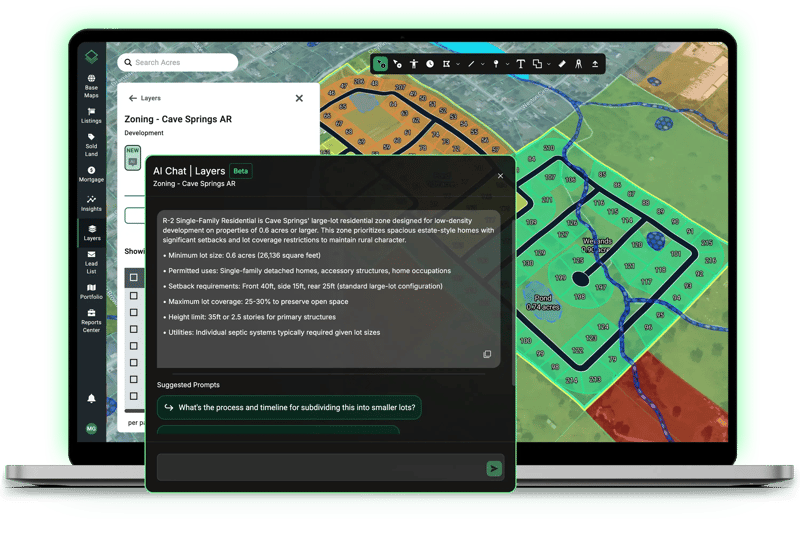
Use the Acres zoning AI chat to ask about the property of interest’s setback requirements, density limits, and future land use designations. Use these answers and any constraint data you have as inputs for your Site Planner layout. With this method, you’re building a lot yield that reflects local code from the start, not one you have to revise once the constraint reports show up.
Define Your Product Types
Set your product types before drawing begins. Townhomes, single-family, cottage lots, each gets its own specifications, color, and region on the map. This is where Site Planner starts to reflect how your team actually builds, not just a generic grid.
Draw and Refine
Roads snap to the parcel boundary and lots populate automatically in the regions you've defined. The summary panel updates in real time, so you always know where you stand on buildable area, road length, and open space.
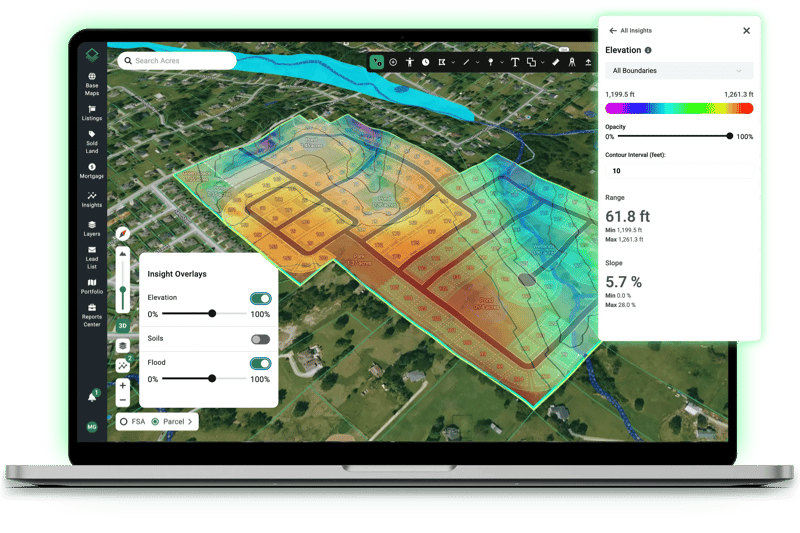
The elevation heat map, flood risk, and soil insights can stay on the map as you design. For a closer look at slope and grade, toggle into 3D mode to visualize the terrain in real time as your plan develops. If a steeply graded corner shows up mid-plan, you can draw around it or map an exclusion area without ever leaving the tool.
Wetlands and flood zones are automatically detected and excluded by default, so the most common site constraints are already accounted for before you start. If your assessment differs, those exclusions are fully editable.
Cul-de-sacs are supported with adjustable diameters, lot lines can be extended, and any road segment can be edited or deleted without touching the rest of the plan. Made a change you're not happy with? Back up and try again without starting from scratch.
Check Your Numbers
The density check panel shows whether the plan passes or fails your zoning requirements as you go. If the numbers aren't working, adjust your lot specs, shift a region boundary, or extend a road and watch the yield update immediately.
By the time you're done, you have a site plan stress-tested against real constraints, ready for the next conversation.
What Changes When Feasibility Happens Faster
The impact of compressing feasibility analysis isn't just about saving a few hours per site. It changes what's possible across your team's entire pipeline.
A team that can run a credible lot yield in minutes can move through more sites in a week than they previously could in a month. That means maintaining a larger active pipeline, responding to more opportunities as they come in, and making faster decisions across the board.
The bottleneck shifts from how long the analysis takes to how good the opportunity actually is, which is where a land team's time and energy should be spent.
For teams managing multiple active prospects, Site Planner also makes it easier to keep a site alive without over-committing to it. A saved plan inside Acres is easy to revisit, adjust, and share, so a site that looked marginal at one density can be quickly re-evaluated at another, or handed off to a colleague for a second read.
It also means that when a team does bring a site to a site engineer, they're arriving with a clear picture of what they're trying to build, making that engagement faster and more productive too.
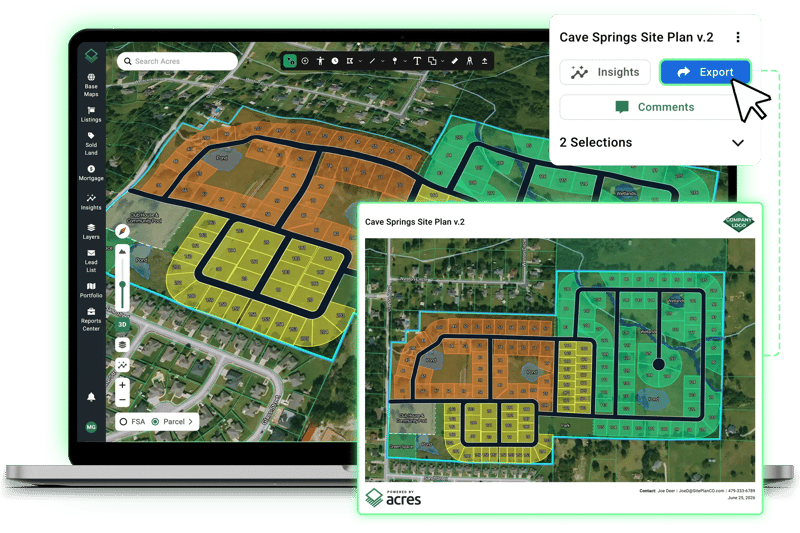
And when it's time to share the plan externally with a partner, a leadership team, or a land seller, the export is a branded, full-screen PDF that looks like a deliverable, not a screenshot.
Land Data That Moves at the Speed of the Market
Site Planner represents a broader shift in how land teams can work when all of their site intelligence lives in a single platform and is built to be acted on, not just looked at.
The ability to run a lot yield in Acres, using the same parcel boundaries and zoning data you've already been working with, is a direct extension of that. It means fewer context switches, fewer tools, and a faster path from prospecting to a qualified site ready for the next step.
Site Planner gives land teams a fast, accurate way to run lot yield and feasibility analysis directly inside Acres. Book a demo today to see how easily you can clear out unviable parcels and fast-track your strongest deals.